30.11.16

Successful Sales and Marketing Alignment, Part 4: When to Pass a Lead to Sales


This post is part of a series to help B2B organizations understand and implement sales and marketing alignment. Part one was about getting started. Part two showed how to identify the target buyer and their journey. Part three outlined the steps to designing a successful lead process. We’ll now outline what defines a qualified lead.

The “qualified lead” definition is the point at which marketing determines that a lead is ready to be handed to sales. Without a shared definition, sales usually complain marketing is sending them bad leads and marketing complains sales isn’t following up on their hard-won leads. Establishing this definition is one of the most important things you can do to foster cooperation between sales and marketing. The qualified lead definition should cover demographic information (such as company size), situational information (such as their current pains or challenges) and behavioral information (such as webinars watched, specific pages visited, papers downloaded). It’s good to include information that shows clearly why the lead is ready for sales.

A qualified lead must be a demographic fit

The first step is to identify the demographic parameters of a qualified lead. Analyze your current customer base to find common denominators. Look for demographic parameters such as company size (employees or revenue), industry, job title, business model, and geographic location.

A qualified lead must have demonstrated relevant engagement

Look to the lead’s activity history. Did they open and click on an email? Attend a webinar? Fill out a form? Download a competitive analysis? Which web pages have they looked at, and for how long? A genuinely qualified lead will display proactive engagement.

A qualified lead must be ready to speak to sales

Don’t send unqualified leads to sales, even if you’re striving to make a benchmark number. This damages trust and inhibits their desire to follow up on marketing-generated leads. For full cooperation, sales must be able to trust the leads marketing sends. When you did your buyer persona research, you should have uncovered the steps your best buyers took to become your customers. Be very aware of the late-stage steps that amount to buying signals and score them as such. This will let sales know why you’ve sent them the lead and will foster confidence in your process.

Create an agreement and have both sides sign it

Document the qualified lead definition using a service level agreement (SLA) and have both marketing and sales sign it. This clarifies the understanding and uncovers doubts about the definitions if the parties aren’t willing to sign. The document should include the demographic and behavioral traits a qualified lead must have. It should also include marketing’s responsibilities (develop qualified lead, provide required information, hand-off to sales) and sales’ responsibilities (follow up on leads in a timely and thorough manner, provide regular feedback).

Here’s an example of what an SLA for lead qualification might look like:

Here’s what’s needed for a successful lead qualification SLA:

1. Required Lead Information. 

Marketing is responsible for providing correct contact information with their qualified leads. Required information should be limited to information that sales must have in order to sell. Any non-essential information should be optional or left out completely.

2. Demographic Qualifiers. 

Demographic filters ensure the lead fits your target buyer profile. In this example, leads under 100 employees would be excluded. Most companies choose to filter leads based on either company size or annual revenue, but not both.

3. Behavioral Qualifiers. 

Behavioral qualifiers include any activity that shows buying intent. These can (and should) be adjusted and optimized over time.

4. Both sales and marketing must sign the SLA.

Here are the steps to developing your own process:

  1. Commit to developing a qualified lead definition.Sales and marketing must commit to developing a qualified lead definition. In many organizations, marketing creates a qualified lead definition but sales never sees it, or agrees to it.
  2. Use your buyer personas as a starting point.Make sure you refer to your target buyer personas as a starting point for your qualified lead definition.
  3. Get anecdotal feedback on the qualified lead definition from sales.When designing the qualified lead definition, it’s essential to sit down with individual sales reps and ask them: What is a qualified lead for you? That doesn’t mean the organization agrees to deliver these types of leads, but it is critical to find a way to get as close as possible to creating a qualified lead definition that sales is willing to work with.
  4. Determine demographic qualification information.Demographic characteristics often used in qualified lead definitions include company size, location, the buyer’s role, or industry.
  5. Determine behavioral qualification information. Decide what actions the buyer can take that will qualify them to speak to sales. For example, marketing might pass on any leads that download certain whitepapers or attend a specific webinar. Some organizations ask the question “Would you like to be contacted by sales?” on their registration form to determine whether a lead is truly ready and willing to talk to sales.
  6. Forecast whether marketing can deliver enough qualified leads.If the parameters are too narrow, what may look like the best possible lead definition might not work because marketing won’t be able to supply sales with enough leads to fill the pipeline. This is a critical part of the qualified lead definition phase and may require some negotiation between sales and marketing. In some cases, sales will need to accept a broader qualified lead definition in order to fill the funnel with a sufficient number of leads.
  7. Create a service level agreement for marketing. Marketing’s SLA should specify it will pass onlyleads that fit the qualified lead definition. Marketing should also agree all the required fields are filled out, and that qualified leads will be delivered to sales in a timely manner. Marketing needs to commit to deliver a certain number of qualified leads each quarter. The qualified lead number should be tracked on a weekly basis.
  8. Create a service level agreement for sales.Sales should agree to follow up on leads in a timely fashion. Best practices recommend that sales follow up on leads within 30 minutes of receipt and no longer than one day. Sales should also agree to a minimum amount of touches over a defined period of time. How many, and for how long, depends on your business model and sales cycle. For example, you’re selling a low-priced service that requires no capital outlay, and the typical sales cycle is about 30 days. In that case, the sales organization could agree to three phone calls and three emails over two weeks for every qualified lead they receive. Higher-priced items and complex sales could take much longer and require many more touches across multiple channels. Sales should also agree to update the status of every qualified lead that is passed to them.
  9. Sign and publish the qualified lead definition.The qualified lead definition is like a contract and should be treated as such, which means it should be shared with everyone who takes part in it.
  10. Revisit the qualified lead definition.Each quarter, sales and marketing should meet to determine whether the qualified lead definition should be modified. For example, the company might be launching a new product that serves a new demographic and the definition should be updated to reflect that.

Defining, scoring, and nurturing can be a complex process, but when you implement sales and marketing alignment, the result can be a streamlined, efficient lead nurturing machine.

Stay tuned for the next blog post in this series, where you’ll get an up-close look at the lead handoff process.


from Act-On Marketing Action Blog http://ift.tt/2gUQMG8
via IFTTT

7 Tips for Improving Online Sales Using Social Media

social media toolsWant to improve your online sales process?

Looking for tips to connect with prospects and customers on your social channels?

With the right plan, you can enhance people’s social media experience and generate more sales.

In this article, you’ll discover seven tips to improve your ecommerce using social media.

7 Tips for Improving Online Sales Using Social Media by Aaron Orendorff on Social Media Examiner.

7 Tips for Improving Online Sales Using Social Media by Aaron Orendorff on Social Media Examiner.

#1: Provide Sales Support With Native Chat

Native chatting (or “conversational ecommerce”) is using the messaging services within each social network to automate, customize, and personalize your communication.

With higher retention and engagement rates, these apps have quickly become the go-to choices for customers who want to connect more directly with businesses. In other words, if you’re not using chat apps to automate confirmations (and yes, even to sell), you’re missing a huge social ecommerce opportunity.

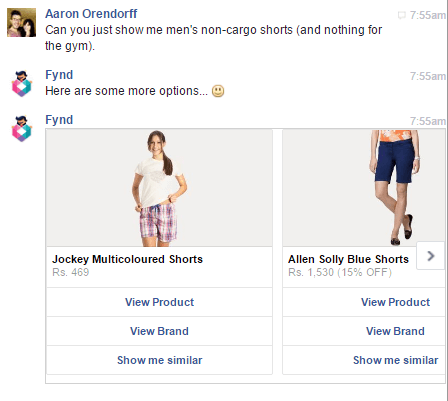
However, approach automated chat apps (like Facebook Messenger Bots) with caution. It’s too easy to cross over from the human to the inhuman side of conversational commerce.

For instance, using native chat for blatant marketing (as if it’s the newest and coolest email list) is a huge no-no. Likewise, so is relying on it to automate front-end sales.

Don't rely on native chat to automate the sales process.

Don’t rely on native chat to automate the sales process.

But used by humans for humans, the benefits can be massive.

Take Bontact, for example. It’s a multi-channel, real-time support service that allows you to manage native chatting on any network or device. Being able to respond to questions and problems natively (meaning within the natural channels your customers already communicate on) helps you provide better customer service, increase customer retention, and build a positive brand image.

Bontact's dashboard lets you manage all user conversations from a single place. This helps you tailor assistance (and even move toward upselling and cross-selling) based on consumer history.

Bontact’s dashboard lets you manage all user conversations from a single place. This helps you tailor assistance (and even move toward upselling and cross-selling) based on consumer history.

#2: Monitor Conversations About Your Business

Social media is a goldmine for listening to and participating in customer conversations. However, the constant onslaught makes it difficult to identify the information that really matters. Brand listening is the art of deriving valuable insights by observing, compiling, and analyzing conversations about your brand, industry, and competitors.

Keeping a finger on the pulse of your online audience helps you salvage tricky situations, reward brand advocates, generate new leads, mine creative marketing techniques, identify customer pain points, track sentiments, and gauge motivations. On top of that, the keenest companies track their competition, too, ready to swoop in and help any dissatisfied customers.

All of this requires you to go beyond monitoring your official social media mentions. That’s where Talkwalker comes in. It’s a social media analytics and reporting platform that will examine both text and visual content.

The social listening functionality taps into the complete spectrum of conversations across 150 million websites, social networks, print outlets, and media broadcasts. The tool’s analytics will benchmark your performance against competitors, pinpoint conversational themes, trace viral hashtags, and identify relevant influencers.

Monitoring your explicit brand mentions on social only tells you half of the story. Talkwalker pulls in comprehensive data, even when you're not tagged.

Monitoring your explicit brand mentions on social only tells you half of the story. Talkwalker pulls in comprehensive data, even when you’re not tagged.

#3: Encourage People to Share Their Customer Journey

Success on social media depends less on how much you talk about yourself and more on how much your customers talk about you. Similar to UGC, purchase-process sharing means encouraging consumers to share their favorite items before, during, and after a purchase.

As evidence, nearly 1 in 3 Facebook users has made a purchase after “sharing, favoriting, or commenting” on the product themselves.

AddShoppers is an on-site ecommerce platform that makes word-of-mouth marketing easy via incentivized purchase-sharing techniques like social rewards and refer-a-friend campaigns. You can leverage customer satisfaction to interact with audiences you otherwise might have missed or ignored, and strike while the (ecommerce) iron is hot.

Incentivize purchase-process sharing using AddShoppers. Your customers are far better salespeople than you'll ever be.

Incentivize purchase-process sharing using AddShoppers. Your customers are far better salespeople than you’ll ever be.

#4: Make It Easy to Buy on Your Social Channels

Social-driven retail sales are growing at a faster rate than all other online channels, and buy buttons play a starring role in this growth. Buy buttons let users make seamless and secure purchases from within social networks themselves. They reduce what’s normally a multi-step process to a single click. Let’s look at two options.

Facebook Buy Button

In June 2014, Facebook unveiled their first buy button to the public. This September, they launched a buy button for Messenger. If you host a Facebook store, you can showcase your best products, hold special Facebook sales events, display exclusive merchandise, and have a dialogue with customers.

Whether on your fan page, in your Facebook store, through paid ads, or even in Messenger itself, Facebook offers a host of direct buying options.

Whether on your fan page, in your Facebook store, through paid ads, or even in Messenger itself, Facebook offers a host of direct buying options.

Pinterest Buyable Pins

Pinterest rolled out buyable pins in mid-2015 to a select group of retailers, and now the option is available to everyone. The extended shelf life of pins, the enormous reach of repins, and the appealing aesthetics positioned Pinterest as a powerhouse of social ecommerce. A mixture of “aspirational and actionable” pins will stimulate purchases, increase product reach, and maximize revenue.

Pinterest recommends creating variations of buyable pins to address each stage of the social purchase journey: just looking, maybe I could, I'm narrowing it down, and I know what I want.

Pinterest recommends creating variations of buyable pins to address each stage of the social purchase journey: “just looking, maybe I could, I’m narrowing it down, and I know what I want.”

#5: Curate and Feature User-generated Content

User-generated content (UGC) is content created and shared by your fans, followers, and customers on social platforms, either spontaneously or through contests or giveaways.

Does curating UGC work for ecommerce? Absolutely. According to Business Insider, consumers who come across UGC are 97% more likely to convert than those who don’t.

User-generated images (images created by customers featuring your products) are especially powerful. In fact, when online shoppers were asked to choose between UGC (like people post to Instagram) and professional images on product description pages, the overwhelming preference was for Instagram photos: 77% to 22%.

Those kinds of findings are why Yotpo created their social curation tool for Instagram. Using authentic visuals will demonstrate social proof, drive high-intent users from Instagram to product pages, increase on-site conversions, and improve ad performance.

Yotpo lets you collect, curate, tag, and feature Instagram photos on social and your ecommerce site.

Yotpo lets you collect, curate, tag, and feature Instagram photos on social and your ecommerce site.

#6: Produce Seasonal, Topical, and Event-related Content

Nearly all ecommerce businesses operate on a seasonal calendar, and for the most part, they do a great job of creating sales, discounts, emails, and incentives. They’re also outstanding at stocking their social streams with announcements about all of those seasonal ecommerce activities.

Where most stores fall short, however, is with creating seasonal content that isn’t overtly promotional. Why is that a bad thing? Because dominating your seasonal activity with one pitch after another comes off as thoroughly disingenuous … and even antisocial.

The answer is to get organized with a social content-creation platform like PromoRepublic.

With a library of thousands of seasonal, topical, and thematic templates (including celebrations as specific as Hugh Laurie’s and other celebrities’ birthdays), PromoRepublic makes it easy to craft genuinely social posts related to the events your audience cares about. Plus, the content calendar lets you load and schedule those date-sensitive posts.

With PromoRepublic, you can create seasonal, topical, and event-related updates without being too salesy.

With PromoRepublic, you can create seasonal, topical, and event-related updates without being too salesy.

#7: Create Social-friendly Images

You’d be hard-pressed to find any kind of social content without visuals. As users get more discerning, however, they’re shunning generic stock images. A Chute Digiday study on the state of visual marketing determined that more than 70% of respondents find images at least twice as effective as text content alone.

The problem is what do you do if you’re not a designer and can’t afford to hire one? Two tools stand out.

For true-to-life photos, Buffer’s Pablo lets you select from over 600,000 royalty-free photos and/or upload your own, which is perfect for product pictures. Choose from network-specific image templates, 10 filters, 6 use-case templates, and 3 font arrangements: headline, body, and caption. No registration is required.

Add text to high-quality and royalty-free images using Pablo. Plus automatically create images sized correctly for each social network.

Add text to high-quality and royalty-free images using Pablo. Plus, automatically create images sized correctly for each social network.

For graphics and infographics, Venngage offers hundreds of templates to quickly create detailed visuals even if you have no design skills. The templates are categorized into Beginner, Intermediate, and Advanced to accommodate your level of expertise and experience with the product.

Design shareable social media graphics or infographics with Venngage (even if you're not a designer yourself).

Design shareable social media graphics or infographics with Venngage (even if you’re not a designer yourself).

Conclusion

Do the words “social selling” conjure up sleazy images of unsolicited and heavy-handed pitches instead of conversations, the very thing social media is supposed to be about?

Ads on social media are far from ineffective, but if they’re the only tactic you rely on, the odds of your ecommerce business coming off as decidedly antisocial are high. Instead, it’s vital to add in one or more of these seven “musts” to your ecommerce social media mix.

What do you think? Do you use some of these social media tactics to enhance your sales process? What tips can you offer? Please share your thoughts in the comments below.

7 Tips for Improving Online Sales Using Social Media by Aaron Orendorff on Social Media Examiner.

7 Tips for Improving Online Sales Using Social Media by Aaron Orendorff on Social Media Examiner.


from http://ift.tt/2gUIRc9
via IFTTT

Plasticity


Plasticity

It's possible that you're the way you are, that you do what you do, that you react as you react, and that it can never be changed.

Believing this is incredibly sad, though.

Each of us is capable of just a little more. A little more patience, a little more insight, a little more generosity.

And if you can do a little more, then, of course, you can repeat those changes until you've done a lot more.


from Seth Godin http://ift.tt/2gUCmpF
via IFTTT

29.11.16

Facebook CEO's posts about 'fake news and hoaxes' temporarily vanished

SEO without search results is here with Google Assistant, Home and Amazon Echo. Here’s how to survive.

google-home-orange4-1920

On the first full day that we had a Google Home in our house, we interacted with it 473 times over the course of the day. Four hundred of those were my two-year-old asking it to play “Cherry Bomb” by The Runaways, followed by his mother or me interrupting with, “Hey Google! Stop!”

(Look, I love that song, too, but enough is enough, you know?)

The point is, watching the way that my family interacts with the device, and how often they interact with it, I’m more inclined to believe the forecast that sales of Amazon Echo and Google Home type devices will go from 1.8 million this year to 15.1 million in 2020.

Have you seen this demo video from Google I/O?:

It really can do all of those things, like turn on your lights and help you plan your day. There are many times where it gets stumped and says “Sorry, I’m not sure how to help with that,” but not nearly as many as Amazon Echo, as you can see in Danny Sullivan’s review. For the most part, it’s useful — and sometimes fun.

And as more people use smart speaker devices like these to get their information in a world without search engine results pages (SERPs), SEOs will have to adjust if they want to stay relevant.

Here are three ways SEOs can best position themselves for a world of assistant search without SERPs, powered by devices like Google Home and Amazon Echo.

[Read the full article on Search Engine Land.]


Some opinions expressed in this article may be those of a guest author and not necessarily Marketing Land. Staff authors are listed here.


from Marketing Land http://ift.tt/2fyQ4OA
via IFTTT

Share your obsession with SEO & SEM as a team & score BIG at SMX West

smx-attendee

Do you manage the search marketing team at your company or agency? Sister site Search Engine Land’s SMX West is the ultimate team building experience, where members will get must-know SEO, SEM, mobile, and conversion optimization tactics at more than 50 sessions and from 100 expert presenters.

Not only will you and your team be learning, you’ll also have an opportunity to network with industry leaders and be inspired by case studies and incredibly knowledgeable and experienced speakers and brands.

Is your team sophisticated?

Search marketing is constantly changing so there’s always something new to learn and changes to prepare for:

  • Your advanced SEMs can sharpen their skills with the latest tactics for Enhanced Text Ads, audience targeting, scripts and match types.
  • Your advanced SEOs can develop strategies for coping with Google’s Accelerated Mobile Pages, recent mobile-first approach and leveraging the power of link-building and advanced SEO tactics.

Do you have new members on your team?

Have them attend our SMX Boot Camp which teaches your inexperienced team members all the search marketing basics — SEO, SEM, copywriting and link building in just 1 day.

Conversions need a boost?

Send your analysts for a deeper dive in KPIs, attribution, and ROI-maximizing tips in the Analytics & Conversion track!

Does your site need restructuring?

Send your developers for deep dives into the technical aspects of SEO and SEM. They will learn how to optimize site architecture for maximum search results and to keep up with ever changing and increasingly complex technical solutions.

With more than 50 sessions, keynotes, panels and clinics, there’s always a session happening at SMX West that benefits your team members.

Don’t take our word for it, attendees rave about SMX West.

“Sending team members to SMX has many benefits. They learn, network and are inspired by their experiences at SMX. That translates into better ROI for our customers and reinforces our commitment to their careers.”

-Benu Aggarwal, Founder & President Milestone Internet

If you and your colleagues share an obsession with SEO and SEM, bring them to SMX West and score deeper discounts as a team:

  • Teams of 3-5: save 10%
  • Groups of 6-11: save 15%
  • Parties of 12 or more: save 20%

To get your group signed up, all you need to do is complete this team registration form and email it to registration@searchmarketingexpo.com.

Flying solo? You’ll still benefit from incredible savings with our super early bird rates. Register for an All Access Pass and pay only $1,695 — that’s $300 off on-site rates. You’ll get full access to conference sessions, keynotes, networking, WiFi, and hot meals — the ultimate experience for search marketers.

-The SMX West Conference Team

P.S. Your satisfaction is guaranteed. Attend SMX West with confidence! If you are not satisfied with the experience we’ll give you a credit towards a future SMX event of equal or lesser value.


from Marketing Land http://ift.tt/2g2kxAP
via IFTTT

How Fixing Client Analytics Can Help Agencies Sell More

A completely accurate client analytics account is few and far between.

That forces you, brave agency veteran, to roll up your sleeves and try to make sense of the chaos you’re looking at for each unique scenario.

You didn’t plan for it. You didn’t charge for it. And now, if you don’t fix it, you’ll face an uphill battle in trying to prove the resulted you delivered.

Like it or not, addressing this issue head-on and fixing client analytics can help you sell more, and sell more profitable work.

Here’s why.

The Problem with Pricing Digital Services

Most clients have no idea what we do.

They pay us – very well in some cases – despite not truly grasping how we’re going to deliver the goods for them.

Sure, they might grock the buzzwords a little bit. They understand the jargon and the high level perspective. But it’s mostly a superficial understanding.

When you get down in the weeds, and start describing how exactly to get from A -> B, you start to lose them a little as glazed over eyes stare back at you.

That’s not a knock; it’s just reality.

In the same way you probably could care less about what’s wrong with your car engine and how a mechanic is going to fix it. You just want to know if you’re going to be able to make it to Happy Hour in time this afternoon.

More often than not, clients are paying us based on trust. Or a leap of faith. Or our smiles and fashionable clothes.

And when they don’t fully grasp the full context of their problem, or the work involved in each painstaking individual step you have to take to fix it, they gravitate towards the one thing that’s easy to separate you from everyone else that says they do exactly what you do: price.

Cue competitive bids and escalating downward pricing pressure.

So what do you do the next time around?

You piece together a meager cost plus estimate that rarely includes Profit (and you’ve undoubtedly underestimated Project Management), double check the marketplace, and rush it out the door.

In contrast, the best, most profitable agencies use value-based pricing. Instead of starting with what their internal costs might be, they start with forecasting:

  1. The new revenue a client can generate, or
  2. The cost savings a client might see as a result of working with them.

For example, you can take a look at their historical averages of traffic and leads. If you’re able to come in and bump that conversion rate by 10%, 15%, or even 30% over the course of a few months, what does that look like in new revenue based on their average customer value?

sensitivity-analysis-lead-conversion-rate

Boom. If simple conversion tweaks and changes can lead to $40K-$160K+ in new revenue, there’s MORE than enough room to pay you 20-30% of that.

That covers your software, payroll, meetings, and then some. You can actually scale a business on that.

Even better, is if you can show how increases in results – less your agency costs – results in NET gains too.

organic-search-growth-revenue-growth-spreadsheet

But there’s a problem.

You can’t even begin to forecast potential revenue for clients like this when they’re missing a critical piece of the puzzle.

Why Fixing Your Client’s Analytics Should be Priority #1

Value-based pricing includes showing a client the outcome and end results of your work in clear-cut business objectives that they can understand (like leads gained or costs saved).

But…

If they don’t have a complete view of their marketing and sales funnel – which, like 97.75% of companies are guilty of – you’ve got a problem.

To make matters worse, these issues can be tough to spot ahead of time, before you dive into their account (which means you probably didn’t plan for it in your timeline and you sure as hell didn’t charge for it as a line item).

Maybe the conversion-tracking pixel is on the wrong page (or even worse, sitewide). Or perhaps they’re using legacy CRM software that doesn’t allow you to figure out what happens after someone becomes a lead (like, where’s da revenue coming from?!).

Either way, before you even touch a single line of code, fix a broken link, or put together a wireframe, you need to get an accurate benchmark of where a company is at right now.

Here are three reasons why.

Reason #1. Determine Where Results are Currently Coming From

A quick view of a company’s Acquisition Channel performance in Google Analytics can give you a snapshot of where they’re at, and how they’re doing.

Sure, the visits or sessions piece is moderately helpful, cluing you into which campaigns are delivering (or not).

But the real value comes in analyzing which channels specifically are driving leads and customers (and how much each is worth).

Now you start crossing over from raw data to insight. You’re able to draw lines between where budget is being spent and where results are coming from.

This helps you figure out what’s already working for clients so you can pour on more, and spot what’s already been tried that hasn’t worked (so you don’t make the same mistakes).

Arguably more important though, is that it will provide you with a baseline to compare against after you deliver your services.

revenue-report-tracking-advertising-kissmetrics

Reason #2. Isolate Campaign/Promotion Attribution

You hear that?

The screeching tires. The scent of burning rubber. A loud crash.

That catastrophic train wreck of epic proportions you’re about to witness is your new client’s analytics.

Their complex, multi-faceted business has taken its toll, with independent systems for each department that don’t work well together (and would require a quant-jock, Business Intelligence analyst to figure out).

Instead of relying or messing with existing systems, setting up a third-party analytics solution to isolate how your campaign and promotion is performing might be an easy way to sidestep the nightmare.

fall-promotion-landing-page-new-funnel-report

This Funnel Report will not only show you which promotional efforts are driving awareness, but also give you insight into the funnel performance for each channel, helping you identify patterns and discrepancies between how visitors from each channel (like cold vs. warm traffic) add items to your cart or complete a purchase.

You can dive even deeper into the individual customer profile, taking a look at the specific steps they took prior to purchase. This can help you identify which pages are assisting conversions, and also spot any bottlenecks or gaps that others keep hitting that causes them to bounce.

person-details-kissmetrics

Reason #3. Make Better Marketing Decisions

Leading indicators are helpful. To a point.

They give you a preview or snapshot of what might potentially happen on down the line.

For example, SEO is a lagging indicator. Sure, you can measure new pages built and new links generated, but it’s still gonna take some time for Google to reindex, new rankings to fluctuate, traffic to start dribbling, new leads converted from said traffic, and only then do you get some verifiable sales opportunities to start tracking.

That means you’ve got a waiting game, and in the meantime you’re making a bunch of changes and assumptions based on incomplete information.

Things get especially challenging when some of these indicators can lead you astray, like when that high conversion rate might backfire.

Here’s how it works: you run some headline A/B tests with generate more initial leads. Numbers go up and you pat yourself on the back. Only problem? Sales – the number that actually matters – go down as a result.

Fortunately, the Kissmetrics A/B Test Report can help you run split tests that will only declare a winner when an event is met further down the funnel, which helps you avoid getting too excited over an increase in clicks (which aren’t super helpful) and waiting for the big payoff instead (conversions).

kissmetrics-ab-test-report-on-engage

How to Sell Extra Work with Analytics Insight

Design is subjective. It shouldn’t be, but it is.

My favorite thing to witness is a fiftysomething executive who has literally zero knowledge of art and design, or the owner of an old-school insurance brokerage, make specific design critiques and changes (like, “I think that shaded border should be gold instead of gray”).

Which, if I were a designer, would surely cause me to become a statistic you hear about on the Nightly News.

So how can design, something so subjective that every client thinks they can do better than your Creative Director, deliver quantifiable results that will allow you to charge more?

Look for leverage points.

For example, why does someone need that new landing page?

“I need a landing page design for an AdWords campaign,” says the client.

Ok cool – then in reality they don’t just want or need one landing page, but they’re gonna want (and need) multiple ones. Here’s why (and how to sell it).

Landing page design will help dictate Quality Score, which has been proven multiple times to influence your Costs Per Click (and thus, Cost Per Conversions).

cost-per-conversion-quality-score-graph

Image Source

“If your quality score increases by 1 point, your cost-per-conversion decreases by 13%,” according to Jacob from Disruptive Advertising.

Awesome. So in order to increase that quality score as much as possible, you’re going to need specific and relevant landing pages for each campaign you’re running. Which means you’re going to need multiple versions of the same page so that you can align message match to drop your Cost Per Conversion and increase the total conversions you’re getting.

Now, that’s going to require some extra work.

You, dear client, will also want to make sure that copy and content changes for each page and that you set-up at least basic analytics to make sure we can track all of this and make iterations on-the-fly. That’s going to require these new additional line items to our scope.

We recently went through this exact process on a new website redesign and performed a quick analysis after 30 days with the new AdWords landing pages.

The results?

We compared results to the same period, prior year to rule out seasonality. So in 2015, their Cost Per Converted Click was $482.41 and their Conversion Rate was only 4.08%.

cost-per-converted-click-1

During the new 30-day window in 2016, their Cost Per Converted Click dropped to $147.65 and their Conversion Rate jumped to 12.76%.

cost-per-converted-click-2

Total score?

  • Cost/Converted Click: 69.39% cost reduction
  • Conversion Rate: 212.74% conversion rate lift

Now multiply those ‘efficiency’ metrics against the results (like total leads, or the amount spent for those leads), and you can quickly highlight your financial value.

Think there was enough room in that budget for a few extra landing pages? And now some more work?

Our only job as a consultant is to improve the client’s position. (I think that comes from Alan Weiss.)

You’re the expert, not them. And as such, you need to fight for the scope (and thus the required resources and budget) it’s going to take in order to deliver the results a prospect or client is looking for (whether they understand what it’s going to take or not).

Because my hairline is becoming increasingly more like Jason Statham’s, and jawline has never resembled Brad Pitt’s, the only way I can figure out how to do this is through cold, hard, analytical data.

Conclusion

Clients commonly don’t fully understand the scope of what you’re being asked to do.

That’s OK. It’s manageable.

But only if you can translate your value into something they do understand – like marketing KPI’s or business objectives like revenue and costs.

The problem is that becomes impossible without a strong foundation for analytics.

There’s no way to benchmark past performance, to isolate your individual campaigns, or spot customer bottlenecks along the way.

Fixing or addressing a client’s analytics problems then should become priority #1.

Because it will not only help you justify the current work you’re doing for them, but also sell the results in the future to them and new ones just like them.

About the Author: Brad Smith is a founding partner at Codeless Interactive, a digital agency specializing in creating personalized customer experiences. Brad’s blog also features more marketing thoughts, opinions and the occasional insight.


from The Kissmetrics Marketing Blog http://ift.tt/2gFPLiq
via IFTTT